

Databases organize information (fields) in structures (tables and files). A flat-file database only has a single table in a single file. FileMaker became a relational database many years ago, allowing for multiple tables within the same file and allowing them to play together. You can now connect tables. This avoids redundancy and enables many options, both functionally and visually. There are a few ways you can connect tables (create relationships). This article is about these relationships and favors a specific model of relationships, called the “Anchor-Buoy” model.
What are relationships?
Relationships in a database environment like FileMaker are connections between tables. These connections allow you to link information to some other information. The type of linking will define it as a one-to-one (1:1) relationship, a one-to-many (1:n) relationship, or a many-to-many (n:n) relationship. This can create specific and unique links, category links, or cross-linking of many records.
Relationships are useful, for example, to enable quick finds of related records from other tables, to read or write data to other tables, and such things; they reduce redundancy of information and by that, help to maintain the integrity of the data.
Examples of relationships:
- One invoice has multiple line items with sold products. The invoice is in one table; the items are in a linked different table.
- One address or company can have multiple employees or persons attached to it.
- In a workflow, certain stages of production can be linked to multiple other stages.
- In a library setting, a book can have added information in other tables, like the author, the publishing house, the series it was published in, and many more things. These other pieces of information are best kept in separate tables but can be linked to each other.
Note: The relationship model you choose is essential for the success, maintainability and longevity of your solution.
Best practice
FileMaker is quite forgiving when applying different methods of creating relationships. The only fixed requirement is that you link tables by linking two fields. This is done in the database window (File > Manage > Database), in the tab “Relationships”. There you find a visual representation of all tables. Each table has at least a single occurrence but frequently gets several occurrences for different purposes.
Within that view, you can click on a field of any table occurrence and drag it to another field of another occurrence. That way you create a relationship between those fields and, by definition, between two tables. Each relationship has a purpose. You define that purpose by not only defining the link (visualized by a line between the different tables and fields) but also by defining some settings (visualized by a block in the middle of that line, which you can double-click to open the settings).
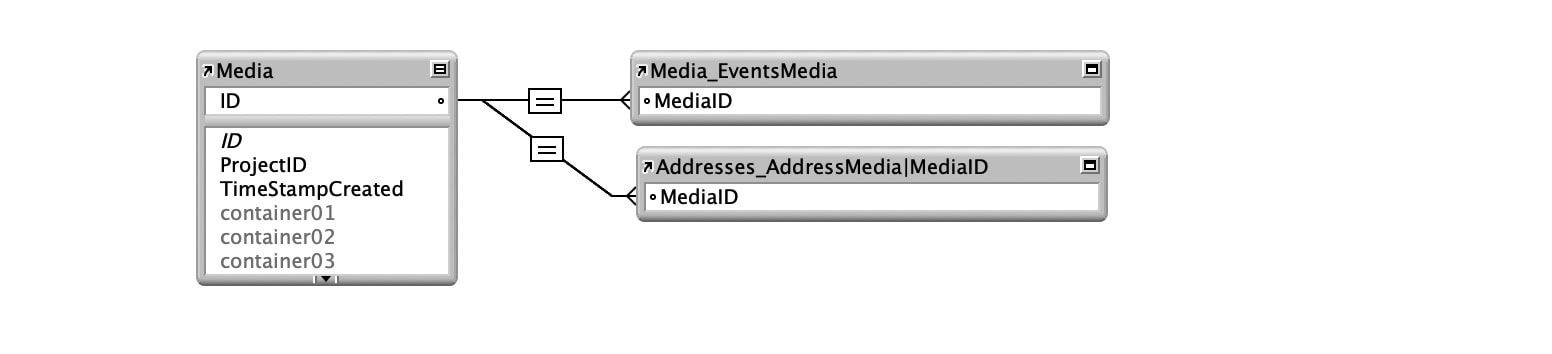
Beyond these basics, you can create relationships as you like. FileMaker does not confine you to a certain method. Yet, it is helpful to give this a thought, as each decision you make will have consequences down the road. Every developer has to deal with both the decisions and the consequences. As it turned out, not every approach is simple or sustainable over the long run. People came up with preferred methods of creating relationships. While several methods worked at first, not every method was bulletproof, so to speak, once the application grew.
The best practice thus has nothing to do with the linking itself but with the structure you use around this linking. You create the environment within which you will develop your application. You are the builder of an ecosystem. Best practice recommendations help you to thrive when you build your personal ecosystem in your next app.
Consider each relationship model in FileMaker as an ecosystem. Here are several versions frequently observed out in the wild.
3 basic relationship models
Over time, several approaches were tested, and today, the following three are recognized among many FileMaker solutions:
- Spaghetti-style
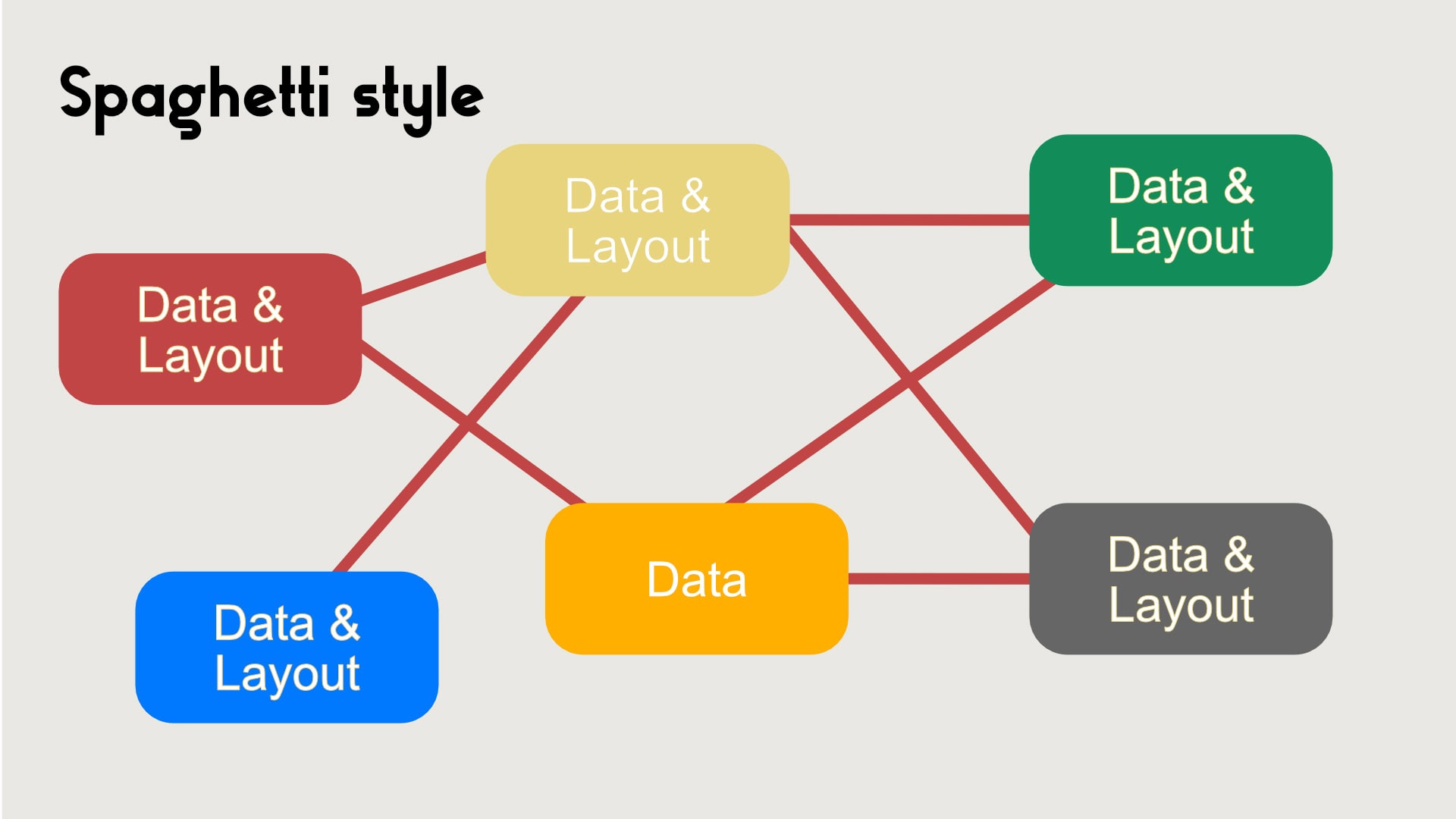
No strategy. Everything is connected with everything. Layouts are everywhere. Scripts start at possibly any location and can cause unpredictable results because of that. Most developers start out by just trying to work with FileMaker, create relationships as they go, and end up with a spaghetti-style mess in which everything is entangled. Applications that grow this way organically become increasingly difficult to maintain and develop. - Anchor-Buoy
Clear strategy, in which starting points and options are well defined. One always knows where layouts should be and what relationships are available from that point. This is the model and topic of this post. Most professional developers, to my best knowledge, use this method today. It is best practice. - Selector-Connector
System of relationships and an advanced application of the Anchor-Buoy model. All relationships exist in a system with global application for the file. It fulfills the desire to be able to go anywhere and do anything when relying on the system. It also locks you in a system. The system requires more knowledge and careful application for each step than the simpler Anchor-Buoy model. That also might be its weakest point. Most developers I know, who tried the Selector-Connector model, moved back to the Anchor-Buoy model for several reasons. Among these reasons are complexity, performance issues, and system dependency.
The Anchor-Buoy model solves the unpredictable and messy situation of the spaghetti-style model while avoiding the complexity of the Selector-Connector model. It is in a sweet spot, which is easy to understand and use.
While FileMaker, as an application, does not care about what model you use, developers choose to go for a certain model because of certain benefits. You cannot go wrong with the Anchor-Buoy model, as it is simple, transparent, and understood by many other developers. It is a good starting point because of all these reasons.
Here are some benefits of the Anchor-Buoy model listed:
- Easy set-up
- No system, just an understanding
- Visually clear
- Maintenance and development are easy
- Scripting is simplified by this approach.
There are also some downsides:
- The structure of this model must be understood
- You end up with many more table occurrences.
Now let’s have a closer look.
Spaghetti-style
This is the most common type of styling for anyone starting off with FileMaker. Embrace the options FileMaker gives you and just keep on walking. There is nothing inherently wrong with this approach, but there are downsides. These downsides usually make a solution unpredictable, difficult to maintain, and eventually challenging to develop. While it all starts simple and quick, it can quickly derail into something that is not easily understood and takes increasingly more time the further you go.
This is the type of application some clients and companies develop for themselves until they see no way out. At that point they call a professional developer, who has the almost impossible task of disentangling the mess. The first thing a seasoned developer will do is look at the relationship model and start speaking with the client about the things to solve.
What a professional developer immediately sees is the type of relationship model, which is the cause of much of the trouble the client spoke about. Solving the issues at hand would basically require a remake of the application by choosing a better relationship model. That, however, would mess up scripts, layouts, and all the workflows, based on the spaghetti-style approach. The real question then is this: Do you want to invest in an entirely new development or try to improve only specific issues? It is a question of budget and time.
Often, a new development is not wanted because of the investments in time and money and probably some pride for the original application. The developer can try to improve the situation by rearranging the table occurrences in the relationship graph to make it more transparent and strengthen the relationships where possible. However, that doesn’t change the underlying approach. New developments within the same application will most likely be set up by using a different kind of relationship model, independent from the original structure.
The spaghetti-style method is logical if you just started exploring FileMaker. It occurs naturally, but over time becomes increasingly difficult to work with.
Anchor-Buoy
The Anchor-Buoy model of relationships is the most used variant among developers. This is for good reasons: It is easy to understand, reliable, future-proof, and proven in countless professional applications.
This is not about a religious appreciation of a certain way of doing, but about practicality. There is no must here, but it will enable you to create reliable solutions that are simple to maintain and can easily be enhanced. The approach tries to make it simpler to strengthen it. It is something similar to that slogan: “Simplify your life”.
The Anchor-Buoy principle does so by defining table occurrences in the relationship graph to fit specific purposes. Each table occurrence is either an anchor or a buoy. According to their function, they can or cannot do things. That is not a technical limitation by FileMaker but a decision by the developer to simplify development. It is a way of approaching the inner structure of the file.
How does it work?
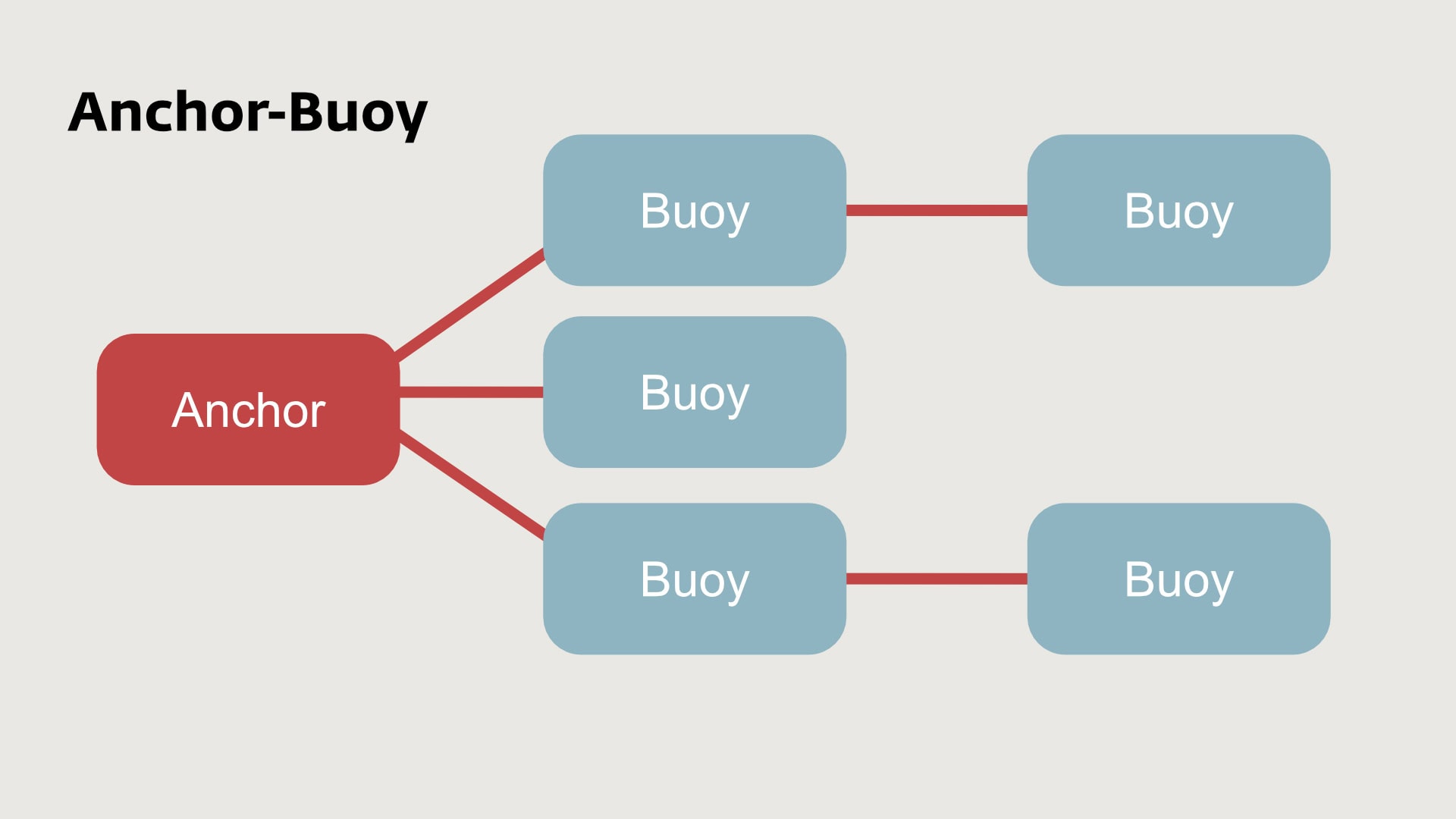
In an Anchor-Buoy model, you look at table occurrences from a developer perspective. Each so-called “anchor” can have multiple “buoys” attached. Anchors never are linked. It is always a single anchor and one or more buoys. One such group is something like an island. Mostly, there are multiple of these islands in a single application, where each island has an own set of anchors.
Here are some specifics:
- Anchor, the central element
Layouts are only created on anchors, never on buoys. For that reason, users always will be on an anchor occurrence, and scripts will start on an anchor occurrence as well (by clicking on a button or a layout trigger on that layout). Anchors are usually the starting points for processing. - Buoy, the related tables
Buoys are never used for any layout. Instead, they are used to read or write data, or for something like “Go to related record”. Buoys help your anchor layout and scripts to find, process, or route any information from that starting point.
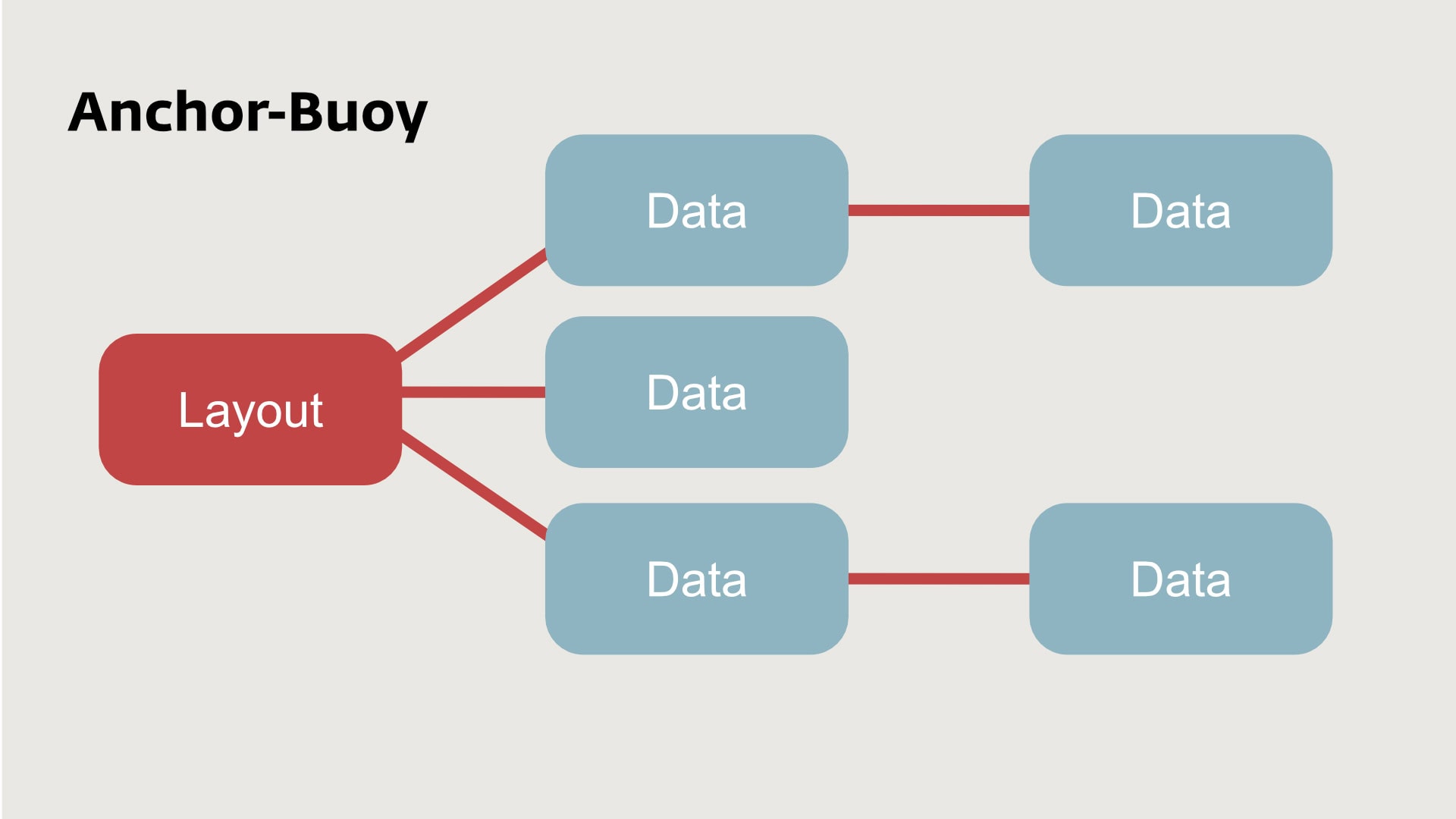
In FileMaker, data and design are intrinsically linked. Each layout is based on and linked to a certain table. Therefore, it is logical to link layouts to table occurrences. It will always be the case. However, it does matter where you put your layouts. In a spaghetti-style setup, you don’t care about the whereabouts of any layout. In the Anchor-Buoy model, though, it matters.
As shown in the image above, different table occurrences are shown. On the left is the anchor defined. There you also find the layout(s). On the right side of that single anchor, you find the buoys. These are used to retrieve or write data.
It is good practice to visually represent the anchors and buoys the same throughout your relationship graph. It is helpful, for example, to always put your anchors on one side and the buoys opposite of that. Like: anchors at the left side, buoys on the right side. Also acknowledge that layouts cannot be built on just any table occurrence, but only on anchors. This simplifies a lot. It tells you where your anchor is and thus where your layouts need to be.
Let’s explore that in a bit more depth.
Example
Assume you are working with a table called “Addresses” and you have other tables linked, like “Contacts” and “CommunicationData”. Now let’s assume we consider where to put the layout for “Addresses”. Logically, that would be on a table occurrence of “Addresses”. Many developers work with the idea that every first occurrence of any table is, per definition, an anchor. It is the table in its most pristine view and with the most basic naming (just the name of the table). There are no relationships yet, and everything is in the green, so to speak.
Starting with this table, you want to create relationships with both “Contacts” and “CommunicationData”. However, you will not use the first table occurrence of these tables as buoys. Why? These first table occurrences also could become Anchors. Thus, you put all first table occurrences at the left side of the relationship graph and than start adding new table occurrences.
How does that work?
Well, you add a new table occurrence with + in the relationship graph. You then select a table, like “Contacts” and it will add a new table occurrence for Contacts. As there already is a first table occurrence for that table, FileMaker will name that second occurrence something like “Contacts 2”. That’s fine. You can change that name.
A good way to name that second occurrence is linked to its usage. As you want to create a relationship from the Addresses table to the Contacts table, you could name it something like: “Addresses_Contacts”. It has the source table, an underscore, and then the target table. As a personal preference, I add a pipe “|” followed by the relationship field or criterion. A full name for the new Contacts table occurrence could be: “Addresses_Contacts|AddressID”. This is helpful in many ways. By the name, I can get an understanding of the usage. It also lists these names perfectly in alphanumeric sortings.
In our example, you now have 2 occurrences for the table “Contacts”:
- Contacts (to be used for an anchor occurence)
- Addresses_Contacts|AddressID (used as a buoy from the anchor Addresses, using the criterion “AddressID”).
There is no rule about how you should do it. This is just how I use it. Please don’t hesitate to do it differently. Some developers prefer to write their anchor occurrences in CAPITALS. Just be consistent in it. Consistency is a great way to preserve transparency over time.
Island hopping
In an Anchor-Buoy model, you build some kind of islands in your relationship graph. Each island consists of a single anchor, linked to as many buoys as needed. These islands have big benefits compared to a spaghetti-style approach, where everything is somehow linked to everything else. In an Anchor-Buoy model, that is no longer the case. Everything is split up into logical groups, the islands.
Within an island, everything is consistent. It is perfectly clear on which table occurrence layouts are built. Those are also the starting points for scripts. What you can do with data from other tables is defined by the specific buoys of that island. But how can you move from, let’s say, the Addresses island to the Contacts island or Projects island?
That is easy. You can simply jump to any layout of another island, which will be on an anchor occurrence. That is easy. You also can use the function “Go to related Record”. From the Addresses layout, you use one of the buoys to get to a specific set of data. Think of jumping to the contacts of a single company by using the previously defined relationship:
- Addresses_Contacts|AddressID.
In the setting of that script step (“Go to Related Record”) you then choose an anchor layout from the Contacts table, like the previously mentioned:
- Contacts.
Doing it like this lets you easily move around within an Anchor-Buoy setup of your file.
Selector-Connector
The Selector-Connector model is quite interesting and based on the Anchor-Buoy model. Yet, it is enhanced to a system and rule system that makes it a different approach. The Selector-Connector model is not further discussed here in the post. As it is an interesting enhancement, please check out other posts you can find on the internet. Variations might use different words like “Transistor model”.
This concept is interesting for some scenarios, as it builds on a single universal context, through which all functions and data flow. That simplifies or structures requests beyond the options of a mere Anchor-Buoy approach. This can be a demand for a project. Also consider that this unifying approach can be more easily enhanced toward a session model, which is useful for some projects.
Is there a best relationship model?
That question should be answered by now, as I mentioned that most developers I know work with the Anchor-Buoy model. That does not necessarily make it “the best”. It is not the most technically savvy solution, as that is the Selector-Connector model or variations on that. The reason that people moved away from the Selector-Connector model is mostly that it was unnecessarily complex for most work. To create a system, then do everything from that system, needs a lot of overhead.
While the Anchor-Buoy model probably has the highest number of relationships (every island needs its own set of ferries), it has the highest practicality. Simplicity beats advanced setups. It is simple, robust, and solves the issues of the spaghetti-western story. From a pragmatic point of view, the Anchor-Buoy model most likely wins the race.
In any scenario, the spaghetti-style model has the fewest lovers and the most issues. It might work for some if they are extremely cautious and work along their own rules. Consistency and understanding are key to any success and not just a given for that model. Anyone starting out with FileMaker should probably be aware of the dangers of too much flexibility.
Do you think these conceptual thoughts are helpful?
Did you like this insight? Share it with someone who might benefit from it.